Map business requirements and prioritise essential features
Conduct conversations with HR stakeholders and employees
Analyse benchmarks and industry patterns for time-tracking tools
Design sketches and validate them with team members
Produce the final mobile UI and prototype
Align expectations across HR, design and development teams
Year
2017
About this projects
A mobile app that simplifies time tracking, leave management, and clock-in reminders.
SmartAhgora was created as a concept app aimed at solving a recurring problem in the company: employees frequently forgot to register their working hours. The app was intended to integrate with the existing Ahgora web platform used by HR teams to monitor attendance.
The goal was to design a simple, intuitive mobile experience where employees could register their hours, manage goals and medical leaves, receive reminders and access a widget that encouraged habit-building and consistency.
Understanding the problem
The project began by mapping all business requirements to fully understand the needs of both HR and employees. Discussions with HR personnel highlighted pain points such as:
• Frequent missing or incorrect time entries
• Limited visibility for employees regarding their daily and monthly totals
• Difficulty tracking absences, medical leaves and missing hours
Employee interviews reinforced the need for:
• Simple ways to register hours
• Clear indicators of attendance issues
Alerts that prevented late or forgotten entries
These insights shaped the direction of the app’s functionality and core features.
Mapping the experience
After identifying all key features, I created the high-level flow for the app. The experience needed to support:
• Quick hour registration
• A clear overview of the employee’s daily and monthly progress
• Simple access to past days and any issues that required attention
• Submission of medical leaves or documents
• Automated reminders to encourage consistent usage
The experience focused on reducing friction while supporting a habit-building routine.
Sketching & early prototyping
Low-fidelity sketches were created and tested internally to validate the core ideas before moving on to the final UI. One of the main challenges was creating an effective alert system that encouraged users to register their hours consistently.
Testing and team discussions led to a solution combining:
• Push notifications to remind users throughout the day
• A home-screen widget for quick access
This combination offered a simple, practical and user-friendly way to support daily engagement.
UI Design
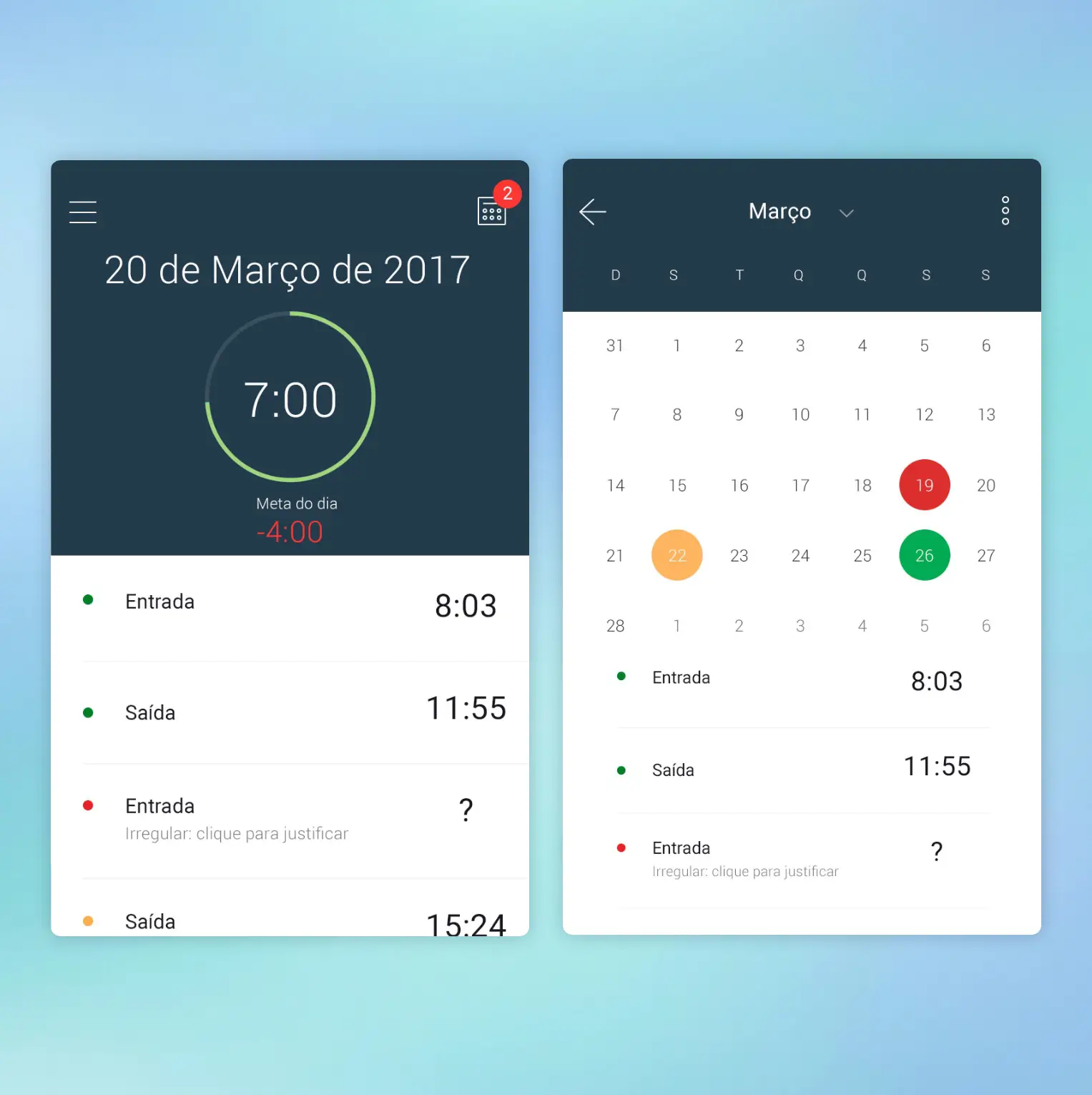
The final UI took a minimalistic approach, using a clean and light visual style to keep interactions simple and digestible. The concept included:
• An alarm-clock-inspired layout to clearly show the hours worked
• A visual graph illustrating the daily total for quick understanding
• A calendar view highlighting days with issues to fix
• Easy submission for sick days and medical leave documentation
The design was created in Photoshop and prototyped using Marvel.
Key learnings
Key learnings
This project provided valuable insight into the needs of HR teams and helped me understand a part of the company I had not worked closely with before. It also reinforced the importance of translating different stakeholders’ expectations into a coherent, user-friendly solution.
Engaging with both HR and employees helped me balance operational needs with user behaviour, allowing the concept to support both efficiency and usability.